When do I need Personal access token?
If you want to deploy your Website directly from a GitHub private repository, you need to create a Personal Access token that will be used by our servers to access your Github Private Repository.
How to obtain it?
- Log in to your Github account at Github.com
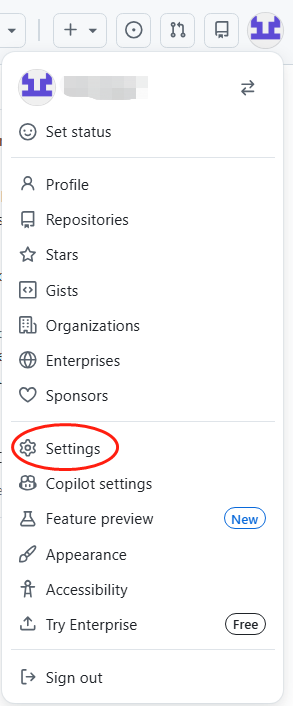
- Click on your account at top right and go to Account Settings.
??
3. Scroll down the left menu and click Developer settings.
4. Click Personal Access Tokens in the left menu and select Tokens (Classic).
5. Click Generate new token on top right menu and select Generate new token (Classic).
6. Now you will see options for generating a new token:
Note = TEST
Expiration = No expiration
Select Repo = Full control of private repositories
and then click Generate token at page bottom.
7. Done, you have the necessary Private Access Token to access your private Github repositories. Save this Token carefully. You will need this token to setup Github integration with your Website.
Article ID: 2330, Created: March 24 at 10:06 PM, Modified: March 24 at 10:57 PM