1. Once you order SSL-O, an email with a list of the required documents will be sent to you. Please follow the instructions in that email.
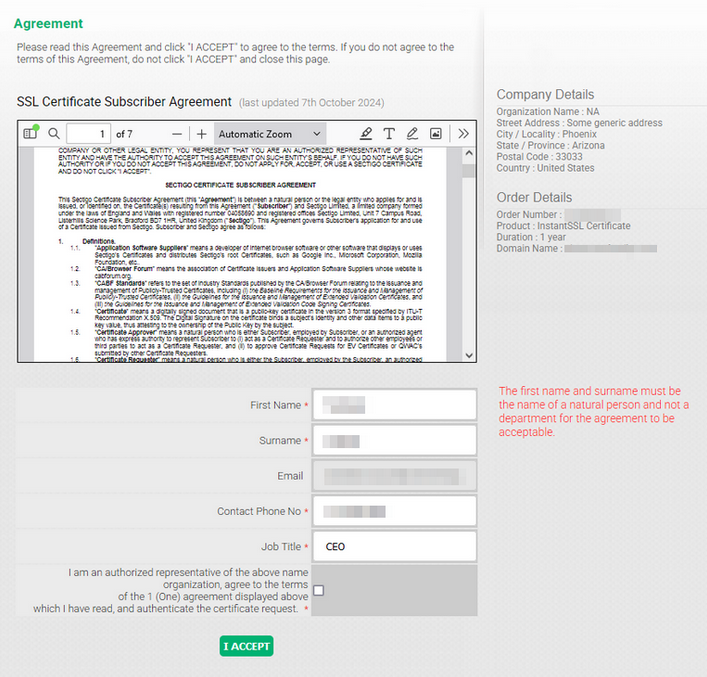
2. Another email - Subscriber Agreement click-through - will be sent to the administrative contact email for your SSL order. You will need to copy the verification code from the email and follow the "Agreement Link" provided to access the verification form. Once the code has been pasted and submitted, the SSL Certificate Subscriber Agreement will appear. You'll need to fill out the digital form with the Certificate Requester and company details for further verification:
3. The callback verification is also an obligatory step for this certificate. It contains the instructions on how to receive an automated call to the verified phone number of your organization.
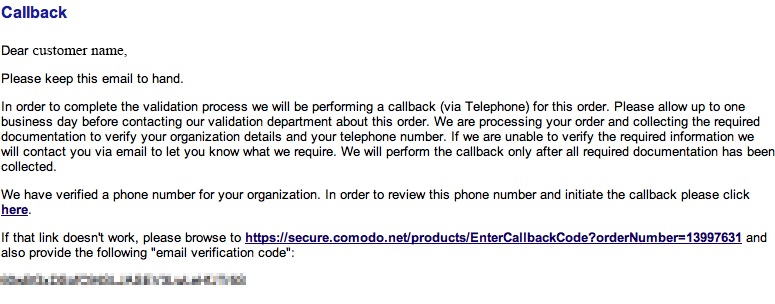
To proceed further, please copy the verification code and click here. The link will take you to the next screen with various options:
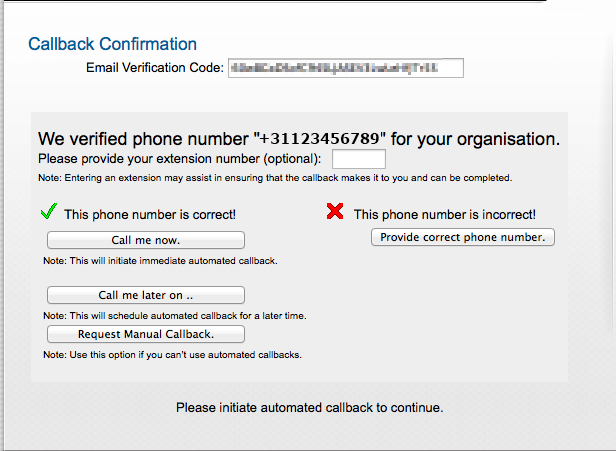
To complete the process, you need to do the following:
-
Paste the Email Verification Code into the corresponding box.
-
Enter a phone extension number (if any).
-
Click the Call me now button to initiate an automated call. You will be provided with a 6-digit verification code.
-
Add the code to the Callback Verification Code field and click Next
Article ID: 2318, Created: November 28, 2025 at 6:43 AM, Modified: November 28, 2025 at 8:16 AM